
Data Reconciliation Automation for Ops and Finance Teams

TL;DR
- Data reconciliation compares the same business activity across systems, such as an ERP, a WMS, a carrier, or a bank, to confirm the records match and resolve the places they don't.
- A working reconciliation has five steps: ingest records from each system, standardize IDs, match using stated rules, separate timing differences from real mismatches, and route each exception to an owner.
- The output is an exception table that shows the source values, the mismatch, its likely cause, and the next action. Nobody should have to scan every matched row to find the problems.
- A reconciliation you can rely on runs on a stated schedule and keeps an audit record of every run: source snapshots, the rules applied, and how each exception was resolved.
- The same pattern covers inventory, freight invoices, budget vs. actuals, three-way PO matching, and cash. Prowork by Parabola runs it as a Flow your team can see and edit.
Data reconciliation is the process of comparing the same business activity across multiple systems to confirm that the underlying records match. When they don't, reconciliation is how teams identify the discrepancies, understand why they occurred, and decide what to do about them.
Every reconciliation, whether it covers inventory, invoices, or cash, follows the same workflow. This page walks through it using one example, a WMS-to-ERP inventory check, and then shows the output, the schedule, and the audit record that make the process dependable.
How to reconcile data across systems: a five-step workflow
In the example, a brand stores inventory with a 3PL that runs its own warehouse management system (WMS), and keeps the financial inventory record in its ERP. Both systems report on-hand quantities by SKU and warehouse, and they should agree.
1. Ingest records from each system
Pull the records you're comparing from every system, plus the documents that explain movement between them. For a WMS-to-ERP check, that's on-hand quantity by SKU and warehouse from each system, plus open purchase orders, receipts, transfers, and inventory adjustments. Record when each snapshot was taken. A WMS export from 11:00 p.m. compared against an ERP pull from 6:00 a.m. will flag every order that shipped in between.
2. Standardize SKU and location IDs
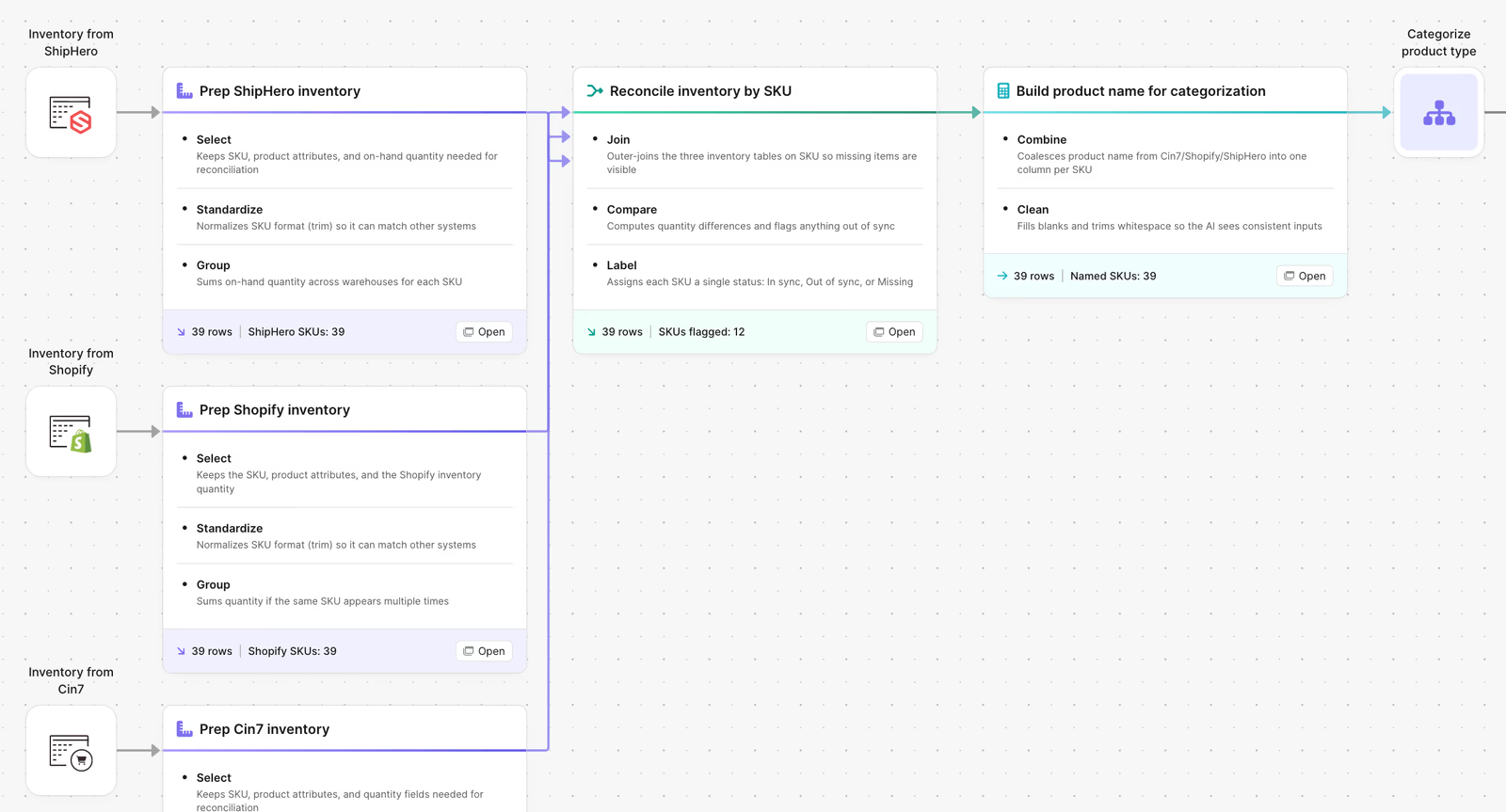
Two systems rarely use the same identifiers. The WMS might export sku-1042 with lowercase letters and a trailing space while the ERP has SKU-1042. The 3PL calls its Dallas building DFW1, and the ERP calls it DALLAS-3PL. Trim, normalize casing, strip prefixes or suffixes, and map every location code to one list. Keep a mapping table for renamed SKUs so history still lines up.
3. Match quantities using stated rules
Write down the matching rules instead of keeping them in someone's head:
- Key: SKU plus location.
- Comparison: WMS on hand against ERP on hand, in the same unit of measure.
- Tolerance: differences of two units or 0.5% (whichever is greater) are logged but not chased.
- Join: a full outer join, so a SKU that exists in only one system still appears as a row labeled "missing" instead of disappearing.
4. Separate timing differences from real mismatches
Many gaps aren't errors. They're activity one system has recorded and the other hasn't yet. Treat a gap as a timing difference only when an open document explains it exactly: a purchase order received in the ERP but not yet checked in at the warehouse, an order shipped after one snapshot and before the other, or a transfer still in transit. Give timing differences a window, such as 48 hours. If the gap hasn't cleared by then, treat it as a real mismatch.
5. Route exceptions to an owner
Every real mismatch needs a person who can fix it, and the direction of the gap usually says who. When the ERP is higher, the cause is usually an early receipt or unrecorded damage, so the row goes to purchasing or receiving. When the WMS is higher, an adjustment or return usually hasn't been booked, so it goes to inventory accounting. When a SKU is missing in one system, it goes to whoever maintains the item master. Each owner sees only their rows, with the evidence they need to investigate.
What the output looks like
A reconciliation should produce two things: the full matched table for the record, and a short exception table that people act on. Here's the exception table from the 6:00 a.m. WMS-to-ERP run in the example:
| SKU / location | WMS | ERP | Mismatch | Likely cause | Next action |
|---|---|---|---|---|---|
| SKU-1042 / DAL | 1,180 | 1,200 | ERP +20 | Timing: PO 5531 (20 units) received in the ERP, not yet checked in at the 3PL | Hold as a timing difference. Escalate to receiving if still open after 48 hours. |
| SKU-2210 / RNO | 336 | 360 | ERP +24 | 3PL cycle count adjusted down 24 units. The adjustment wasn't posted to the ERP. | Inventory accounting reviews the count and posts the adjustment. |
| SKU-3307 / DAL | 58 | 48 | WMS +10 | Customer returns restocked at the 3PL. The return receipts weren't booked in the ERP. | Returns team books the receipts. |
| SKU-4415 / RNO | — | 75 | Missing in WMS | SKU renamed to SKU-4415B in the WMS | Item master owner adds the mapping. The SKU matches on the next run. |
Rows that matched within tolerance, like SKU-5120 at Dallas (412 in the WMS, 411 in the ERP), stay in the full table but don't appear here. Of the four exceptions, one is a timing difference that should clear by itself, and three need a person.
Schedule, exception handling, and audit history
"Reconciles continuously" isn't a process anyone can check. These three things are.
A stated schedule
Decide when each reconciliation runs and why. In the example, the WMS-to-ERP check runs daily at 6:00 a.m., after the 3PL's nightly export lands and before purchasing reviews reorders. A full run at the month-end cutoff feeds the close, and finance signs off on it. Each run pulls fresh snapshots of every source at the same time rather than reusing last week's export.
Exception handling with status and age
Every exception carries an owner, a status (open, timing difference, or resolved), and an age. Timing differences that clear on a later run close automatically, with the document that cleared them noted. Ones that outlast their window are escalated as real mismatches. Track causes across runs, too. If the same cause appears every week, such as one 3PL's adjustments never reaching the ERP, fix that upstream process instead of correcting its output each time.
An audit record of every run
Each run should keep:
- The source snapshots, each with its timestamp.
- The rules in effect (matching key, tolerance, ID mappings, and timing window) and when they last changed.
- The full matched table, not just the exceptions.
- The exception log: owner, cause, resolution, and a reference to any adjusting entry.
With that record, anyone can answer an auditor's question months later: what each system said on March 31, which rules were applied, and who resolved each difference and how.
Why manual reconciliation breaks down
The workflow above can run in a spreadsheet. It stops holding up as volume grows and systems multiply. Manual reconciliation depends on individual judgment: someone knows which mismatches are expected, which ones matter, and which can be ignored. That knowledge is rarely written down. When that person is out or moves on, the rules go with them. Exports have to be pulled and cleaned again on every run, so the schedule slips, and the audit record is usually the first thing to go.
Running the workflow in Prowork
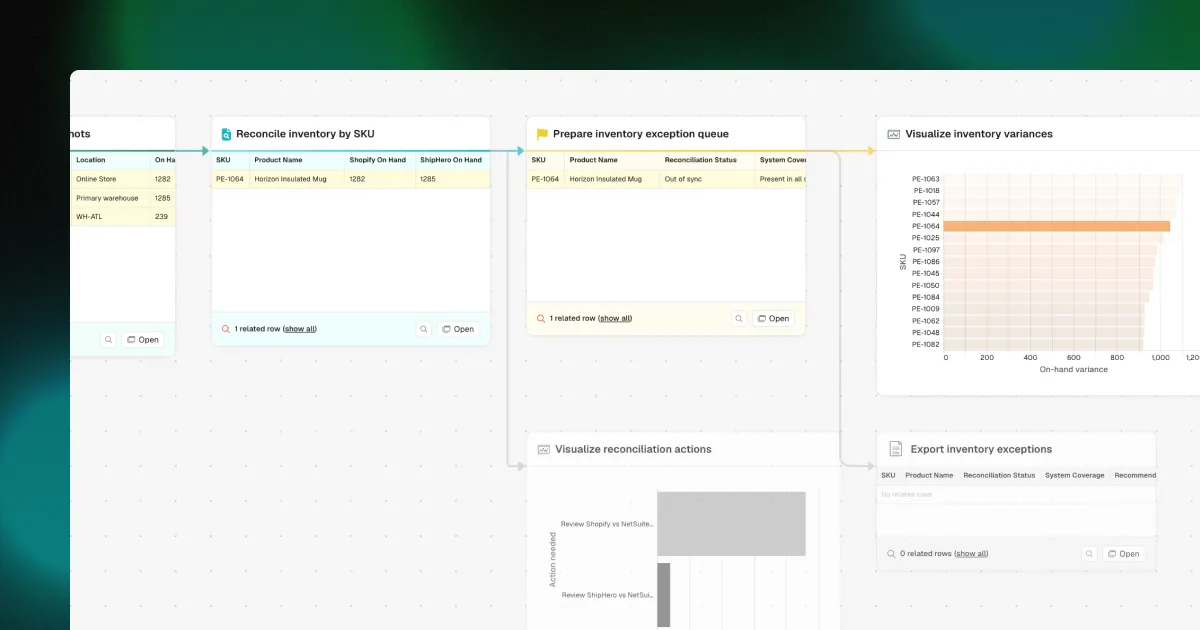
In Prowork by Parabola, the people who own the reconciliation build it as a Flow by describing the process in plain language against their real data. Each step above becomes a visible step in that Flow: pulling each source, standardizing IDs, joining, applying the tolerance and timing rules, and labeling exceptions. The matching rules and calculations stay explicit, so anyone can see exactly why a row was flagged and change a rule when the process changes. AI steps handle the parts that need interpretation, such as extracting line items from a carrier's PDF invoice, without changing how records are matched.
The output is an Artifact: the full matched table plus an exception view grouped by owner. Deploy the Flow as a managed agent and it runs on your schedule, keeping a run history of inputs and outputs, while version history shows when each rule changed.
The same pattern across reconciliations
Each type of reconciliation uses different systems, a different matching key, and different typical timing differences, but the workflow is the same. Here's how it applies to the reconciliations ops and finance teams run most often.
Inventory reconciliation
Systems: WMS or 3PL, ERP, storefront. Match on: SKU and location. Common timing differences: inbound receipts, and orders shipped between snapshots.
For stock-specific detail, including comparing storefront availability, setting tolerances, and a worked example across two warehouses, see the inventory reconciliation guide and the inventory reconciliation use case.
At Great Jones, automated inventory reconciliation helped the team combine inbound purchase orders, on-hand inventory, and sales activity into a single source of truth. That visibility allowed the team to avoid missed sales during peak periods and gave marketing and operations shared confidence in inventory data. Seed Health and Rhone have similarly automated inventory reconciliation across systems while scaling.
Freight and parcel invoice audits
Systems: carrier invoices, rate cards, shipment data. Match on: tracking number and charge type. Common timing differences: adjustments and surcharges billed on a later invoice. Exceptions go to: logistics or AP, before the invoice is approved for payment.
Seed Health automated this process to eliminate hours of daily manual work, reclaiming more than 500 hours per year and reducing invoice review time to minutes.
Automate freight and parcel invoice audits
Budget vs. actual reporting
Systems: the planning spreadsheet and the general ledger. Match on: GL account, department, and period. Common timing differences: accruals and invoices posted after the period closes. Exceptions go to: the budget owner, with variances above a set threshold explained.
Automate budget vs. actual reporting
Three-way PO matching
Systems: purchase orders, receipts, and supplier invoices. Match on: PO number and line. Common timing differences: partial receipts and invoices that arrive before the goods. Exceptions go to: AP and purchasing. Routine matches move through without manual review.
Brands like Magic Spoon, Seed Health, and Rhone have used this approach to reduce reconciliation effort and maintain tighter financial controls as transaction volume increased.
Automate three-way PO matching
Cash reconciliation
Systems: bank statements, payment processors, and marketplaces. Match on: payout or settlement ID and amount. Common timing differences: settlement lag and fees netted out of payouts. Exceptions go to: accounting, so cash position is current before month-end.
automated workflows.