Multi-warehouse inventory consolidation

Combine inventory across every warehouse into one table. Flag every SKU below its reorder point so procurement reorders before stockouts hit.

Get a demo

The prompt

I want to consolidate inventory across my CHI and NYC warehouses. Build me a flow that combines both into one table and flags any SKUs where total available inventory falls below their reorder point.

Just copy and paste the prompt into a new Prowork flow to get started.
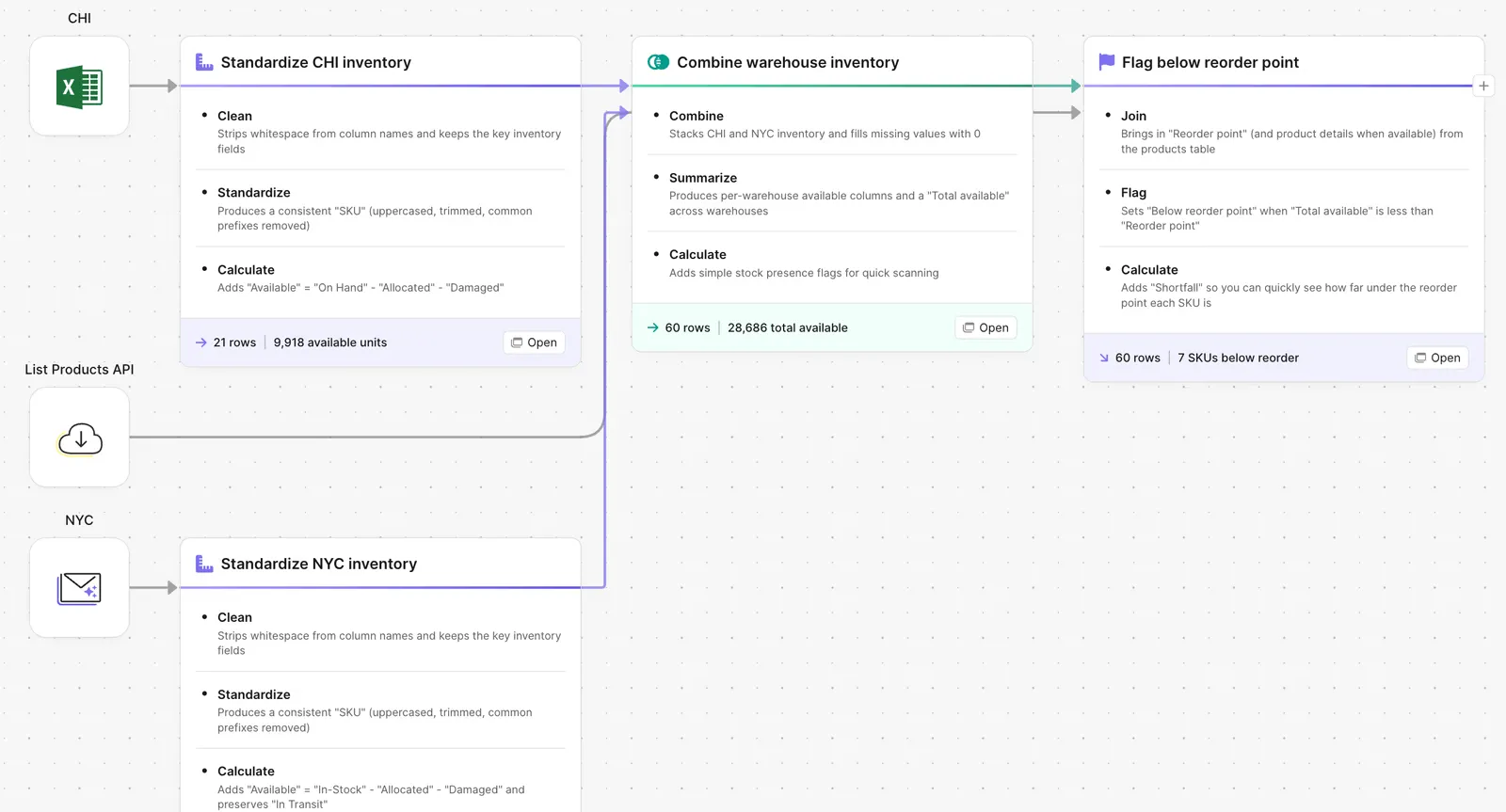
Prowork flow combining CHI and NYC warehouse inventory and flagging reorder points

What Prowork builds for multi-warehouse consolidation

A workflow with five steps you can edit:

1. Pull inventory from each warehouse. WMS export, 3PL portal, or ERP feed per location.

2. Standardize the SKU and quantity fields. One row per SKU per warehouse with the same column structure.

3. Sum to a total available position. SKU-level rollup across every warehouse.

4. Compare against the reorder point. Reorder points live in the ERP or a reference table.

5. Output the table. Full consolidated inventory plus a flagged view of SKUs below reorder.

What is multi-warehouse inventory consolidation?

Multi-warehouse consolidation combines the stock positions of every location into one table, so a SKU has a single total available quantity across the network rather than a separate number per building.

The network view is what reorder decisions actually need. A SKU can look healthy at one warehouse and be nearly out everywhere else, and the reorder point applies to the total, not to whichever location someone happened to open first. Getting there means reconciling SKU codes and quantity definitions that differ by site.

Procurement and planning read it daily, and every new location makes it harder: another system, another export format, another naming convention for the same product.

Why teams stop consolidating warehouses manually

The brand opens a second warehouse. Then a third. Each new location adds its own WMS, its own export format, and its own way of naming the same SKU. Procurement is responsible for keeping the brand in stock across all of them, and procurement is doing the math by pulling one CSV per warehouse every morning and stitching them into a workbook.

The cost of the workbook is not the time. It is the lag. The CSVs are stale by mid-day. The reorder points are accurate as of last quarter. The SKU that needs a PO today does not get one until the workbook gets rebuilt next week. By then the brand is short.

The right answer is one table fed by every warehouse on a schedule, with reorder logic that compares total available to a current reorder point and surfaces the SKUs that need attention now.

How it works

Step 1. Paste the prompt.

Open Prowork, paste the prompt in section 2, and let it ask follow-up questions about your warehouse mix, WMS feeds, and reorder logic.

Step 2. Connect your data.

WMS API or portal export per warehouse, ERP reorder point table, plus any in-transit inventory you want included.

Step 3. Run it every cycle.

Daily is standard. Some teams refresh hourly during peak.

FAQ

Does this handle more than two warehouses?

Yes. Add a source pipeline per warehouse. The standardization and consolidation steps work the same regardless of count.

Can I include in-transit inventory in the available calculation?

Yes. Set the available logic to include in-transit. The flow pulls open POs and pending transfers into the same rollup.

What about allocated inventory?

Same answer in reverse. Set available logic to subtract allocated quantities so the reorder check works against truly available stock.

How are reorder points kept current?

The flow reads reorder points from your ERP or a reference table you maintain. When procurement updates the table, the flow picks up the change on the next run.

How is this different from the WMS dashboard?

Each WMS shows you that warehouse. The flow shows you every warehouse in one view, with reorder logic the WMS does not have.
Reorder before the SKU goes short.
Paste the prompt, point it at your warehouse feeds, and let the consolidation run on its own.
Start for free