Inbound container tracking

Combine inbound shipment data from every forwarder into one normalized table. See every container, every status, every ETA without chasing carriers.

Get a demo

The prompt

I want to track inbound shipments across all our freight forwarders and carriers. Build me a flow that combines each forwarder's data into one consistent table and removes any duplicate shipments.

Just copy and paste the prompt into a new Prowork flow to get started.
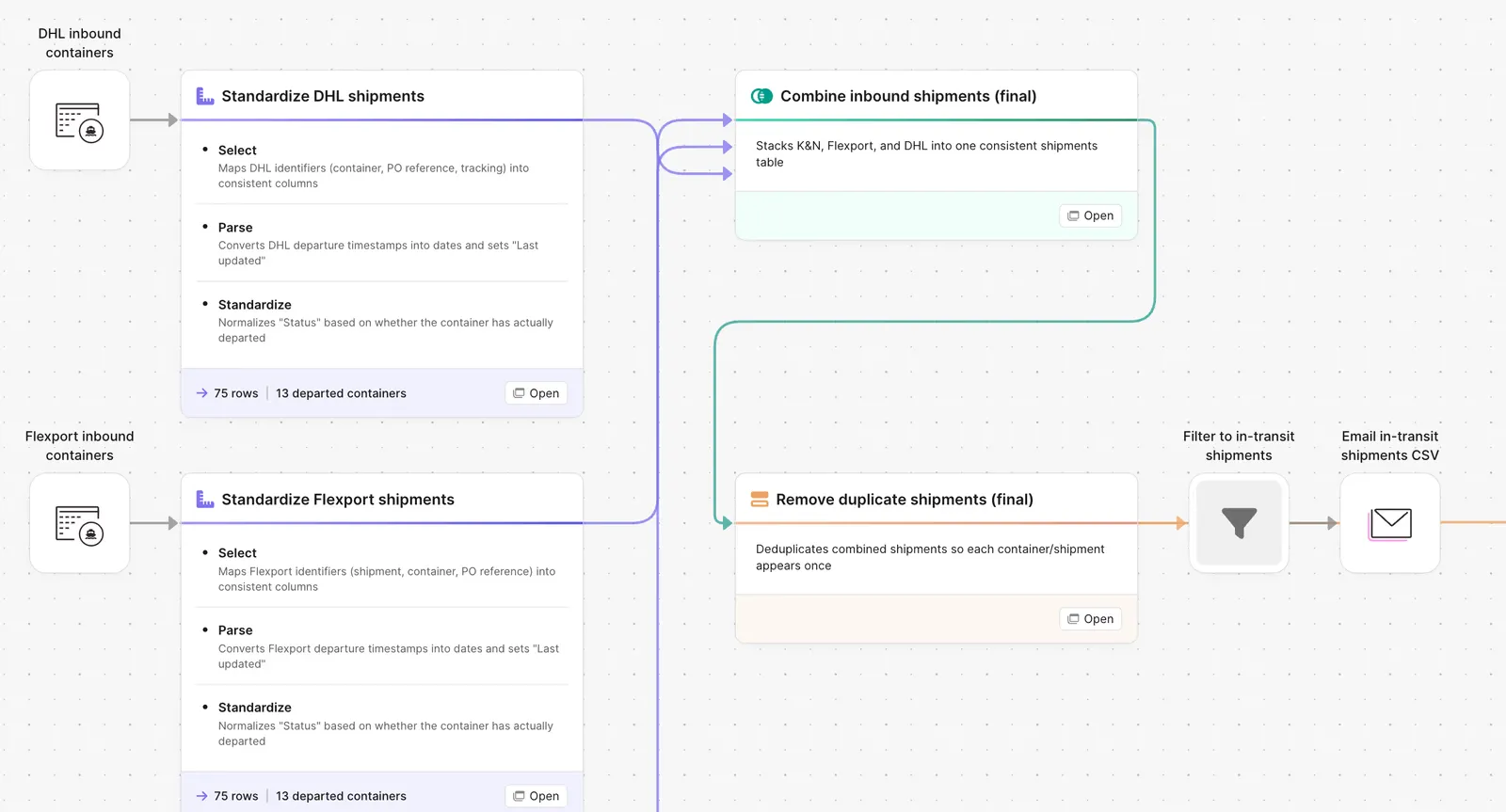
Prowork flow combining inbound container shipments from multiple carriers

What Prowork builds for inbound container tracking

A workflow with five steps you can edit:

1. Pull from each forwarder. API, portal export, or daily email feed. Each forwarder gets its own source pipeline.

2. Standardize the schema. Container number, BOL, PO, vessel, ETA, status. One column structure across all forwarders.

3. Dedupe. Same container, multiple sources, one row in the output.

4. Calculate the position. On the water, at port, in customs, in transit, delivered. Plus days to ETA and days overdue.

5. Output the table. Single dashboard view, exception list for at-risk shipments, Slack alert for changes.

What is inbound container tracking?

Inbound container tracking is a single, current view of every container on its way to you — where each one is, which vessel or truck it is on, and when it is now expected to arrive — assembled from whatever each forwarder and carrier provides.

One table is the hard part. Each partner has its own portal, its own export schema, and its own name for the same field, and the same container often appears in two feeds at once when a forwarder subcontracts. Deduplication and a shared schema are what turn several partial views into a position you can plan against.

Ops and planning read it daily, and everything downstream keys off the ETA: warehouse labor, replenishment timing, and what sales can promise on a SKU that is still on the water.

Why teams stop tracking containers manually

A brand with three forwarders has three portals, three CSV formats, three different ways of naming the same field. The ops team that needs visibility into inbound containers spends Monday morning logging into each portal, downloading the latest update, and stitching it into a workbook.

The workbook gets stale by Tuesday afternoon. The ETA that was accurate Monday is two days off by Wednesday. The container that went into customs Thursday morning shows as "on the water" in the workbook until Friday when somebody refreshes it. The team is making receiving decisions, labor calls, and chargeback risk assessments against a snapshot that does not match reality.

The fix is not a fourth portal. It is a single table fed by every source on a schedule, with a refresh cycle that matches the pace the business actually runs at.

How it works

Step 1. Paste the prompt.

Open Prowork, paste the prompt in section 2, and let it ask follow-up questions about your forwarders, data feeds, and refresh cadence.

Step 2. Connect your data.

Forwarder APIs, portal export feeds, or daily email reports. The flow handles any of them.

Step 3. Run it every cycle.

Daily is standard. Some teams refresh twice a day during peak. New forwarder? Add a source pipeline that follows the same pattern.

FAQ

Does this work if my forwarder only emails me a daily update?

Yes. The flow can pull from an inbox, parse the attachment, and feed the same standardization step. API connections are faster but not required.

How does it handle the same container appearing in multiple feeds?

The dedupe step matches on container number plus BOL. Same container, multiple sources, one row.

Can I flag containers that are stuck in customs?

Yes. Configure a customs-time threshold. Anything sitting at port or in customs longer than that gets surfaced in the exception list.

What about partial loads or LCL shipments?

LCL ships under multiple BOLs that share a master. The flow tracks each BOL line and rolls up to the master container view.

How is this different from the forwarder portals?

Each portal shows you that forwarder's view. The flow shows you every forwarder in one table with the same fields, refreshed on the same schedule.
One table. Every container. Every morning.
Paste the prompt, point it at your forwarder feeds, and let the visibility refresh itself.
Start for free